Worship Tech Web Tools Blog
 This is an ongoing blog of web tools and technology related to worship, music and church. The idea is to give you good web points and resources that you can go to. Some of it is just me cruising the net, others are favorites of friends.
Enjoy what you see here. If you find an interesting, useful and technology related site or resource that deals with helping worship or musicians in general, please send us a note and we will check it out. Perhaps we can feature it here.
Thanks!
Enjoy! - Kim Gentes
Entries in worship (17)
Worship Backing Band - Musicademy (Kim Gentes/ Worship Tech Blog)
 Sunday, May 5, 2013 at 8:02AM
  For twenty years I have been involved in worship ministry in local churches. It has been from both a sense of joy and calling that someone does that. In that time, I have had the opportunity to be involved in churches from 20-500 people, including two church plants and 3 established churches. Along the way, I've been invited to lead at various places with groups ranging from 10 to 1000 and more. Every context is unique and leading worship through music for each context means that you need the right tools and resources.
In many situations, having a compliment of skilled musicians for a full band is not possible. Church plants, special events, youth nights and other situations sometimes leave you standing there with your guitar, playing away, worshiping your heart out. I believe that God is honored when we give Him everything we have each time we worship- our surrendered hearts are what He looks for (Psalm 51:17). That being said, as your community is gathering you can sometimes find yourself with parts of a band (such as a drummer and keyboardist, but no bassist). These people are ready to serve, but it would be helpful to be able to "sub" in that missing player until a person arrives at your church who can serve in that role.
Enter "Worship Backing Band" (WBB for short). A couple years ago, I noticed that a number of these software tools were releasing to supplement musical tracks for musicians in local church settings. I had known the folks at Musicademy because of the great training resources they released over the years (which I had tried and reviewed favorably). So I knew I wanted to check out there new "Worship Backing Band" software at some point.
The version I was able to download is the latest (1.5) and it comes available for the Mac or PC. I choose to do my testing and using it on both a PC and a Macbook Pro so I could get the feel for both environments interactions. Downloading and installing it was simple enough. Once installed, I went and acquired a few songs to do my testing (I chose "Bless The Lord/10000 Reasons", "How Can I Keep from Singing", "Let God Arise" and "You Alone Can Rescue"). The model for this is that you purchase the player for $25 (it always comes with one free song of the month), and then you purchase individual songs that you need (priced from $8.99 down to $6.91, depending on how many songs you buy). Compared to the hundreds of dollars you might spend on Ableton Live (which I have and use, as well) on just the software, this is very, very affordable.
Once you download and install all the songs, you are ready to use the software. The nice thing about the software is that using it on PC or Mac is identical. The interface and functionality is replicated perfectly. Using the system is, above all, simple! The right pane of the application contains a playlist for the songs you want to use in your worship set. You load songs into it by clicking on the "library" button and exposing the songs available to you in the middle pane from your library. Drag and drop the songs from the middle library pane into your playlist on the right.
On the left side pane is a mix control panel for each of the instrument tracks in the song. Everything from lead voice, background vocals, acoustic guitar, electric guitars (2 tracks), keyboards (2 tracks), bass, drums and couple of click tracks (regular and shaker) are available. There is even a vocal cue track.
Here is how you use it:
- First, select the "mute" button for any instruments that you have in your band. (leaving un-muted any tracks you wish to play out loud with your band). Make sure to save your song "mix" by using the "Save Song Mix".
- In the middle pane, adjust the pitch and tempo to your desired settings for your band.
- Click Play.
Basically, 90% of what you will want to do with WBB is covered by those instructions. However, you can adjust the volume for any track if you want more/less of any instrument. As the song plays, you can also jump to or repeat sections using keyboard keys "<>" and "g". The beauty of this tool is that it is clear, simple, and easy to use. If you use a PC or Mac laptop, and want an easy-to-use software package for adding virtual instruments to your regular band members, you should really look at Worship Backing Band.
Once it was installed, I grabbed my guitar and was ready to go within just 30 seconds using this software and my Macbook Pro. While there are no advanced features for saving the segment flow of a song (only the mix), or for adding your own custom tracks, this program allows you to do what you minimally want to do. Musicademy has over 125 popular worship songs in their purchasable song library for your church, which would be 90% of the common songs used by many churches. That along with the the minimalist approach on the interface of this tool makes Worship Backing Band simple, clear and easy-to-use. The nice thing is, you don't have to spend any money to try WBB out. Musicademy has a functional demo version of the software that you can download for Mac or PC. Below is a summary video that is all the instruction I needed to get going and use WBB.
If you want to try out Worship Backing Band, go here and check out the details, download the demo and see the song library: Worship Backing Band
NEW WBB 2.0 Update: After I had completed the initial review of version 1.5, I was able to get a sneak peek at the latest update to WBB version 2.0. This new version comes with a number of significant updates for those who want more power and control. It is important to note that the new Worship Backing Band software (v2.0) will be called "MultiTrack Pro Wav Player". The current version will still be available for those wanting the current functionality and not needing anything else. The main updates I found bring the player up to another level of helpfulness for the local church worship leader. Here are the highlights:
- Seamless Loop & Navigate - Now you can seamlessly loop and jump through song sections. Want to do the chorus again? Now it is easy in "MultiTrack Pro Wav Player". The player automatically queues up the exact right spot to jump back to the start of any section, so it feels musically seamless. You could navigate sections in v1.5 but you had to perfectly time the keystroke required to do so, which is almost impossible if you are also playing an instrument (even with a pedal) and leading a congregation. Now, looping, section navigation and such all keep the song together and flowing like a real band would.
- Save Section Structure - like the above navigation, you can also save the song flow instead of having to remember your customizations.
- USB foot pedal support - you can now navigate through a song by controling the player from a USB foot pedal. Great update.
- Audio WAV Hi-quality- the tracks are now full WAV files and as such have more control and clarify of audio.
- Customize your own instrument tracks - you can now load your own WAV files into a song by importing them. Got your drum loop or track you want to use? Just hit CTRL-m on a song and you can now load your instrument as part of the song mix. Great for more advanced users.
All in all this "MultiTrack Pro Wav Player" update is great. Be sure to check out Worship Backing Band.
Review by Kim Gentes
WorshipMix Articles Answers: "How Loud is Too Loud?" with Jeff Dykhouse (Kim Gentes/Worship Tech Blog)
Sunday, April 7, 2013 at 9:12PM  One of the most commonly asked questions and controversial topics in churches is "how loud is too loud" for music in church worship settings. It is often the responsibility of the music or worship leaders to manage a sound technology group that provides the tools and operation of the events in a church. But many of those leaders are professional sound engineers. So what are they to do?
My best advice- get advice from a pro! One of those guys who is a pro is Jeff Dykhouse. I first got to know about Jeff on the liner notes of dozens of worship CDs. As a music reviewer, I ended up seeing Jeff's name constantly inserted under the assignment of "engineer" or "mixed by" on many well known worship projects. When I had appeared on a Vineyard CD in the early 90's (ya, I've been around that long), once again, I was not surprised to find Jeff's name on that. Folks over the years have told me about Jeff's work on recording projects, and also his work in local churches- helping to consult to make their sound systems work great.
But recently another friend pointed out that Jeff also has posted some really good articles on the proverbial church worship question "how loud is too loud". Jeff answers this question in three excellent articles that are worth a serious look. If you are a church, you use a sound system and you have this question come up often, there is no better a place I can recommend than having you first read and take to heart Jeff's concise answers in his three-part post. You can find them all here:
How Loud is Too Loud (Articles 1-3): http://bit.ly/10kkO5K
by Jeff Dykhouse
I trust that will help many as we all look to make the sound an asset in our worship facilities instead of a liability!
Worshiping with you!
Kim Gentes
houses of worship, jeff dykhouse, loud, mix, recording, sound, sound board, sound mix, sound tech, technology, volume, worship in Audio, Consulting, Mix, Sound Tech, Sounds, Volume Streaming Tech/Webinar Video: "How To Stream Your Worship Services Online" by Dan Wilt & Kevin Weimer
Saturday, November 10, 2012 at 11:57PM Editors Note: I have received a number of requests from people asking about video streaming of their worship services, and I am so happy that I got permission from these fine folks to include some helpful resources on the details of doing this for your church. Below is a 3-part resource (video, audio and PDF) that should help any church get an idea of how to get started in this area. Thanks Dan & Kevin! - Kim Gentes
How To Stream Your Worship Services Online
With Dan Wilt (WorshipTraining) and Special Guest Kevin Weimer (WorshipStream)
 Description: Every church can benefit from streaming their services online. In this webinar we will talk about why churches stream, should it be live or on-demand, one camera versus multiple cameras, and what do you need to get started. There are literally countless options on how to implement a system for streaming, but we will focus on the basics of what you need to know to begin. This is a very practical (non-super-technical) look at how easy it can be to start streaming your services and events online.
THREE (3) RESOURCES: The video, audio and PDF resources that were presented in this webinar are available below in full form below.
Resource 1: Webinar Video
Resource 2 and 3: Audio & PDF Downloads
Free Resource Downloads for "How To Stream Your Worship Services Online"
by Dan Wilt & Kevin Weimer
|
|
|

Editors Post-Logue: If you have further questions about streaming your worship or church services online, you can contact Kevin Weimer directly via http://www.worshipstream.com . He is very knowledgeable in this area and will help answer your questions. I have personally used WorshipStream.com services before and highly recommend them. Sincerely, Kim Gentes
New Kindle Lights The Fire (Kim Gentes/Worship Tech Blog)
Tuesday, November 15, 2011 at 3:18PM  There is no denying it, Apple has been the uncontested monster at consumer devices in the last decade, with iPods, iPhones and iPads. With few flops, save the Apple TV (twice), Steve Jobs and co have led the revolution of simplicity and elegance on designed electronic goods. And frankly, they have opened up new markets that told the customers what they should have, instead of trying to make tweeks to the current world of electronics as they were. So that was the last 10 years. But now, with Jobs gone, what does the next 10 years look like.
Perhaps, not "more of the same", if Amazon has anything to say about it. In fact, with the launch of their latest device Amazon looks like they have finally decided to weigh in, and weigh in heavily, on the device market. Not satisfied with having the world's most popular ebook reader, Amazon has launched a new line of Kindle devices that compete head-on with real tablets. Here is my review of the first version of that device.
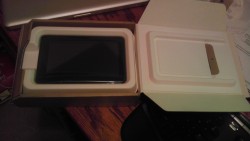 Today is November 15. It is a significant day for many other reasons, but one small reason is the arrival of the new Kindle Fire, personal tablet from Amazon. I had preordered the tablet for work reasons, but was anxious to get it open running as soon as the UPS man rang the doorbell.
The unveiling of my new Kindle Fire repeats a theme that has been taught well by Apple- simplicity. But Amazon takes this theme and perfects it, and expounds on its uses in a broader context. The shipping box containing the Fire was simple and well packed (all with eco-conscious packaging), as is most everything Amazon does in fulfillment. 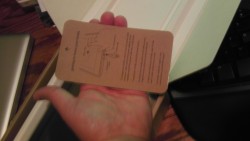 Popping the box open revealed the device (and a small power chord) and a simple sleeve box top. Inside the sleeve was a simple paper card, containing literally 5 simple sentences of instructions. No monster guide, no thing "getting started" manual, just a single card with a big picture and less than a handful of words (which all fit, nicely, in my hand). User guide? Who needs a user guide- this is the new Kindle. OK. Prove it.
The device itself is all black (mine anyways) with just one physical button (power), a single USB connector/power port and a mini-jack for audio. All located at the base of the portrait-held device. There are shallow indentations at the top edge for the audio speakers. The back of the device is a grippy, rubberized cover. Nice tactile surface, 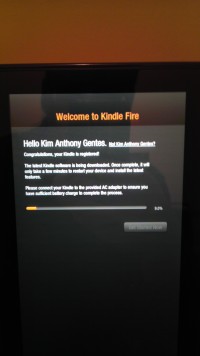 that doesn't slip from your hand and isn't rounded, unlike the iPad 1 whose rounded aluminum back was always slipping and pushing away from the user. Physically, the Amazon Fire form factor is literally 1/2 the size of iPad 1. However, the screen size of the Fire is only about 75% of height and 2/3 of the width, so you are still losing significant screen size, but it feels still large enough for use in your hands.
Booting it up, the Kindle Fire was ready to go by immediately powering up when I plugged it in. And the question to get going on the device quickly had me choosing a network and time zone.
Next came the fun surprise of seeing that the device recognized its owner without me doing anything. Presumably the device was tethered to my purchase account somehow, and immediately recognized who was the owner. Regardless of how this happened, the device customized itself to me and quickly loaded its updates and my own content connections.
On first opening of the device, initial "welcome" guides show how to use the basic functions of the device. In two or three easy arrows I was ready to run and rock with my Fire.
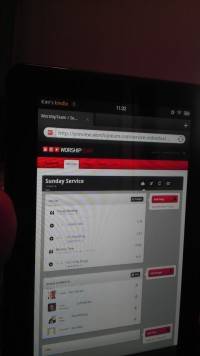 Quickly, I jumped around to see all my kindle books (from my previous purchases of kindle books on the iPad app), all my audiobooks and Amazon cloud music was all available on this device. Some initial download time would get content, but all was accessible without extra logging in or such. Love it.
I quickly went to the web browser and walked through a number of sites, including our favorite, WorshipTeam.com. The Kindle Fire performed excellent on all fronts. Websites with HTML5 and Flash worked perfectly and the performance was snappy. Battery seems to be charged close to top when you get the device, but I topped it off. After five hours of playing media and websites and even videos, the device was still at 84%. Not sure what its battery specs are, but it seems pretty decent on heavy media usage. My version has 6.5Gb of storage, and I began downloading things to it.
After testing out some WorshipTeam.com functions, including the  Android app for it, I went into the Amazon Prime area. I happen to also be an Amazon Prime user, so I was able to quickly access its library of many thousands of videos. I watched a couple minutes of Kevin Costner's "Postman" and the app, media and device performed seemlessly. The video was smooth, audio clear and I wasn't even using headphones, just listening through the on-device speakers.
From there, I went to the Android marketplace and installed a few apps and even downloaded a few not in Amazon store, to see how non Amazon-store apps would work. Answer- perfect! Android apps work well on this device, which of course is an Android tablet. I ran WorshipTeam.com app and it was crisp and responsive.
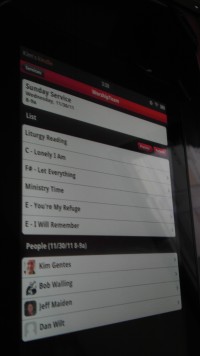 Overall, I like the Fire a lot. Primarily, the UI is its biggest advantage. Smaller than the iPad, it makes a book reading experience work, where the iPad is cumbersome. Movie view is good, though smaller than the iPad. For large app experiences, like car racing, the iPad is nicer, but for practical usages, the Kindle Fire seems well suited and nicely sized. While this device won't eclipse the iPad for now, it is a huge step forward to a functional, easy-to-use, and perfectly sized tablet. The preloading and easy connection of Amazon content is a long term combo-punch that iTunes can't match yet. iTunes is fine, but ultimately Amazon truly seems to understand content better than Apple, from books, ebooks, movies and music. As they catch up with their device, I think you will see that content becomes the ultimately powerful propellant to growing this new tablet ecosystem.
Win Amazon. I highly recommend it!
Amazon Link: Kindle Fire, Full Color 7" Multi-touch Display, Wi-Fi

Review by Kim Gentes.
OS, amazon, amazon.com, android, apps, fire, ipad, kindle, mobile, music, tablet, worship in Amazon, Android, App, Blog, Device, Flash, Hardware, Kindle, Kindle Fire, Media, Mobile, Planning Tools, Review, Social Media, Web Applications, Web Service - Music, Web Service - Video, iPad WorshipTeam.com iOS App with PDF Display and "Music Perform" function - Sheet Music, Chord & Lyric display (Kim Gentes / Worship Tech Blog)
Thursday, July 7, 2011 at 6:24PM  WorshipTeam.com announced an update to its iOS app today with a some nice extensions to its service.
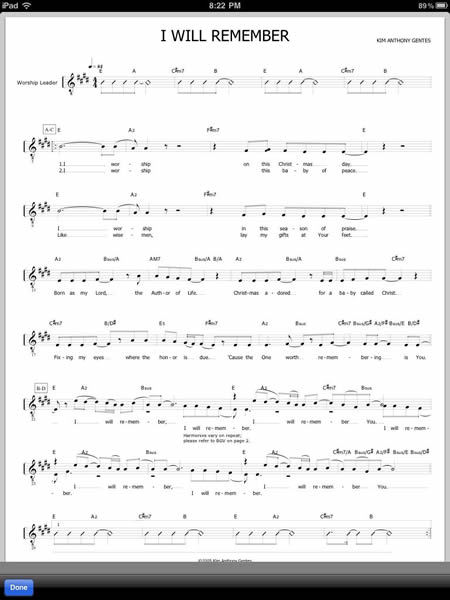
iPad, iPhone, iPod Touch users now have a greatly enhanced app for use with their core WorshipTeam.com service. The app includes the "Music Perform" function that allows users to launch any service (set) into a music stand usable mode. Your iPad becomes a digital music display for all the songs in your services/sets in WorshipTeam.com. Simply swiping the iPad moves to the next song. Additionally added is support for PDF sheet music display incorporated right into the Music Perform function. If you have any songs included in your service/set that you use sheet music PDFs for (instead of standard chord charts) those now display in crisp clarity inside your WorshipTeam.com app.
The app will display PDF sheet music wherever any song can be displayed, including the single song display area or a list or service collection.
For those who haven't heard about the new "Music Perform" function in the WorshipTeam.com App, the goal of the "Music Perform" button is to allow you to have a simple, clean interface with all your songs (PDFs or chord charts) displayed allowing you to page through them, just like you would for a physical songbook on a music stand. Great for use on a stage, in a small group or at home practicing. Your service/set is ready to go without having to print anything off. Here is is how to try it out --
- STEP 1: Install the WorshipTeam.com App on your iPad. Download and install the app for free right here:http://itunes.apple.com/app/worshipteam-com/id409144474?mt=8
- STEP 2: Login and select the "Services" option to see your upcoming services.
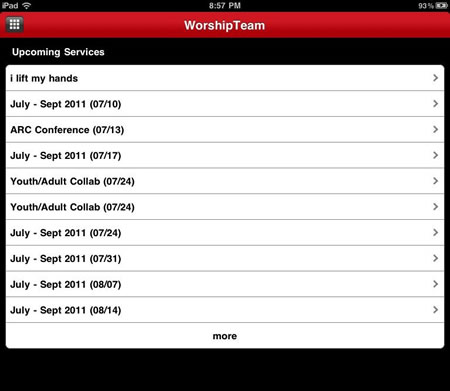
- STEP 3: Go to one of your upcoming services on your schedule and select the "Perform" button.
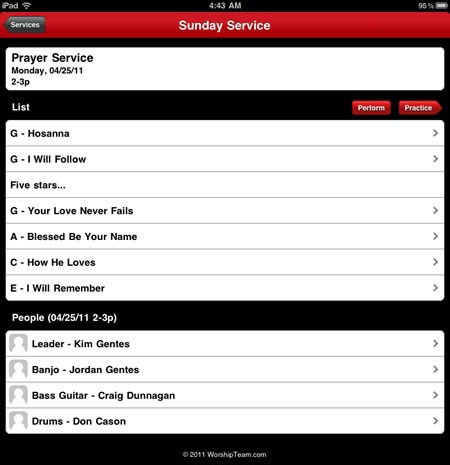
- STEP 4: You will see the first song appear. Controls on the top right allow you to page through the songs. You can also use motion/swipe to move through the songs.

- STEP 5: If you have loaded your own PDF sheet music into a song (view/version) it will display instead of the standard chord chart, as below.
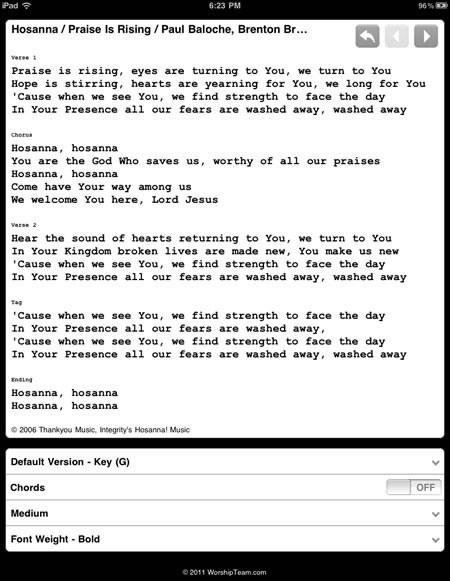
- STEP 6: For regular chord charts, formatting controls are at the bottom of the page if you would like different font and size properties. Note that you can turn chords on or off, depending on your needs (vocalists often only want lyrics displayed for example).
The music perform function works great on iPads used as music stands (as can be done easily by mounts like iKlip (http://www.ikmultimedia.com/products/iklip1), GigEasy (http://www.thegigeasy.com/) or Griffin iPad music stand mounts (http://www.griffintechnology.com/products/mic-stand-mount).
The music perform function is free and included in the iPad app with WorshipTeam.com and does not cost extra. Any WorshipTeam.com user can use this function.
bless you!
Kim Gentes
PDF, chord charts, ios, ipad, iphone, lyrics, music, planner, sheet music, stand, worship, worshipteam.com in App, Device, Mobile, Planning Tools, Print Music, Software, Web, Web Applications, Web Service, Web Service - Music, iPad, iPhone WorshipTeam.com Music "Perform" function - Chord Chart & Lyric display (Kim Gentes / Worship Tech Blog)
Saturday, April 9, 2011 at 4:50PM  WorshipTeam.com updated its service to add a nice new feature for those who love using chord charts and songs from WorshipTeam.com.
For iPad or android tablet owners, check out the new "perform" function now online in the new UI on the mobile site. The goal of the "Perform" button is to allow you to have a simple, clean interface with readable chord charts displayed allowing you to page through them, just like you would for a physical songbook on a music stand. Great for use on a stage, in a small group or at home practicing. Your service/set is ready to go without having to print anything off. Here is is how to try it out --
- STEP 1: From your tablet or iPad go to http://m.worshipteam.com . Login and select the "Services" option to see your upcoming services.

- STEP 2: Go to one of your upcoming services on your schedule and select the "Perform" button.

- STEP 3: You will see the first song appear. Controls on the top right allow you to page through the songs. You can also use motion/swipe to move through the songs.

- STEP 4: Formatting controls are at the bottom of the page if you would like different font and size properties. Note that you can turn chords on or off, depending on your needs (vocalists often only want lyrics displayed for example).

The music perform function works great on iPads used as music stands (as can be done easily b mounts like iKlip (http://www.ikmultimedia.com/iklip/features/), GigEasy (http://www.thegigeasy.com/) or Griffin iPad music stand mounts (http://www.griffintechnology.com/products/mic-stand-mount).
The music perform function is free with WorshipTeam.com and does not cost extra. Any WorshipTeam.com user can use this function.
bless you!
Kim Gentes
android, chord charts, display, ipad, lyrics, mobile, music, planner, stand, tablet, worship, worshipteam.com in App, Display Presentation, Guitar, Hardware, Mobile, Music Training, Planning Tools, Print Music, Software, Web Applications, Web Service, iPad, iPhone WorshipTeam.com App Update to support iPod Touch (Kim Gentes Worship Tech Blog)
Friday, January 14, 2011 at 5:27PM 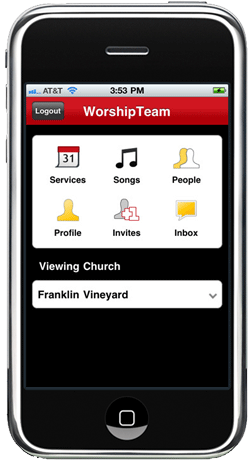 WorshipTeam.com has updated their latest revision of their iOS app to include support for iPod Touch. The update (v 1.01) allows for iPod Touch users to download and use the app with their WorshipTeam.com accounts. iPod users will need to make sure their Touch devices are updated to iOS v3.2 to allow for the app to take advantage of its technology for its song and planning tools.
The WorshipTeam.com app already runs on the iPhone, and iPad devices and allows users to get remote connection to their services, songs, people and communications needed for a fully robust experience with their worship teams.
The app is completely free to download and use. Users must have subscriptions with Worshipteam.com to access content in the app.
Metronome Online (Kim Gentes Worship Tech Blog)
Monday, January 10, 2011 at 8:17AM  Sometimes you just need a reliable time keeper while you work on a tune. You don't always remember to bring your metronome with you as you go through your day. Now, you can have one with you, ready to work when you are. MetronomeOnline.com is an online web app that has tempo settings from timing, style and mode. You can change all the important parameters.
They also have purchasable cell phone versions available, but they charge for those. It's not necessary to pay, since either Android or iPhone both contain free metronome apps in their respective markets.
If you need an online metronome, though, this free, usable and well thought interface is a nice quick web answer.
Check it out here:
http://www.metronomeonline.com/
Keeping His timing,
Kim Gentes
iPhone, iTouch, iPad app releases for WorshipTeam.com (Kim Gentes Worship/Tech Blog)
Sunday, December 26, 2010 at 11:03PM Those that use Apple iOS devices will be happy to know that WorshipTeam.com (the online worship planner) has come out with a new app for those devices. I highlight it below, in a quote from the WorshipTeam.com recent announcement.
 WorshipTeam.com is very pleased to announce the release of our new iOS app, for the iPad, iPhone and iPod Touch devices.
- New Mobile/Device Interface: the new app is part of a new BETA look and feel to WorshipTeam.com's complete full featured operation. Highlighting the power of a sleeker user interface along with the iOS platform, this user engagement is taken to a new level.
- Device Support for iOS: Great support for the new Apple apps platform.
- Extending the planning and song access to your WorshipTeam.com account: need to check the upcoming set for the week on your iPhone? Want to contact members of your worship team now? Confirming invitations to your upcoming services? Need to listen to your songs stored on WorshipTeam.com from your iPad, iPhone or iPod touch? All this and more happens in the new iOS application from WorshipTeam.com .
- No Extra Charge! that is right, we are extending your WorshipTeam.com access with this app at no extra cost. Any WorshipTeam.com subscriber now has iPhone/iPad/iPod touch access to their WorshipTeam.com accounts and workspace and its included in your current subscription!
WorshipTeam.com is still the only FULLY featured and legal worship planning site with thousands of songs included with your subscription fees at no extra cost. We hope this free iPhone/iPad/iTouch app helps you and your team with their planning and songs experience with Worshipteam.com. If you are on your iOS device, download and install the app for free right here: http://itunes.apple.com/app/worshipteam-com/id409144474?mt=8
blessings
Kim Gentes
p.s. if you have never tried out Worshipteam.com, try it FREE for one month by simply going here: http://www.worshipteam.com/try ! See you there. And YES- your free trial subscription INCLUDES full use of the iPhone, iPad, iTouch app!
apple, ios, ipad, iphone, ipod, itouch, mac, planner, team, worship, worship planner, worshipteam.com in Mobile, Planning Tools, Web Applications, Web Service, iPad, iPhone Kim Gentes Launches "Digital Worship News"
Monday, May 31, 2010 at 4:08PM  Digital Worship News (DWN) is the electronic update from worship leader, trainer and innovator, Kim Gentes. Kim's background is a combination of local church worship leader, with an extensive technology innovation background. Combine that with many years experience in the music, media and internet industries, and you see why Kim has served to educate, equip, and encourage those from communities around the world that are needing insight in worship, music and technology.
DWN serves as Kim's voice to speak on these topics. You can subscribe for free, by simply filling out the form below. It comes in email format, and you must sign up to get it, as we do not spam or email anyone who does not signup for this unique electronic report.
What does DWN include? News, information, resources, events, articles and insights from Kim and his friends. As an example of the kinds of information you will get in DWN, look around this website (KimGentes.com) and the DWN issues will be similar in style and content..
Subscribe (below)
digital, email, kim gentes, music, news, newsletter, online, subscription, worship in Media, Social Media, Software, Web, podcast WorshipTeam.com Mobile get LOUD- Full Audio NOW ONLINE!
Saturday, July 18, 2009 at 7:45AM 
New update: WT Mobile just added mobile audio to the feature list! Streamed directly to your mobile device, this is Worshipteam.com for your mobile-- and it rocks! No more burning CDs or such.. Just get the audio right on your mobile device for practicing and learning songs!
You can get more info at www.worshipteam.com
audio, blackberry, iphone, mobile, stream, team, worship, worship team in Planning Tools, Web, Web Service, Web Service - Music My Tech Team Needs HELP! (Answer: WorshipMusicTech Seminar, July 17/18 in Phoenix AZ)
Saturday, July 11, 2009 at 7:08AM 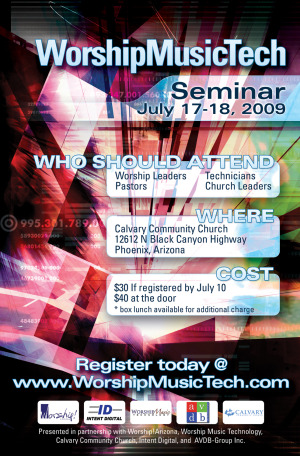
Kim Gentes will be teaching a couple of sessions at an exciting technology and worship seminar in Phoenix, next Friday/Saturday (July 17-18). We wanted to let you know about this tech and worship event and invite you to come. Here is some more info from the seminar below! See you there! Kim
My Tech Team Needs Help!
Like it or not, technology is a part of your ministry today.
Be it lights, sound, visuals, or room dynamics, there is a lot that can go wrong if not attended to properly.
Worship! Arizona is delighted to help sponsor and promote the first ever WorshipMusicTech Seminar coming next Friday and Saturday, July 17-18 at Calvary Community Church, 12612 N. Black Canyon Highway, Phoenix, AZ.
We have assembled a team of professionals from within the Worship Technology Industries to offer valuable information that will help church staff, musicians and tech personnel advance their use of technology. A list of session tracks is available on the WorshipMusicTech website.
Registration is easy and available online for $30.00/person before July 10th. After that the cost is $40.00 at the door.
Schedules, presenters, and breakout session information is available at www.worshipmusictech.com See you there!
Kim Gentes
audio, church, music, sound tech, tech, technology, video, worship in Conference, Display Presentation, Media, Planning Tools, Seminar, Studio Recording WorshipTeam.com goes Mobile - iPhone, Blackberry, and more!
Friday, June 26, 2009 at 4:43PM 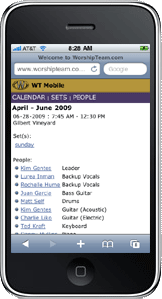 WorshipTeam.com made a big announcement today! They have added mobile access to their platform. I have tested it out and I love it. It's fast, sharply formatted and summed up nicely for mobile brevity. Of course, since I am involved with Worshipteam.com itself, I might be considered biased. But here is the great thing--- WT Mobile comes free with your Worshipteam.com subscription. It does not cost extra! Not only that, you can use it while still checking out Worshipteam.com for free during your TRIAL! Full function of paid subscriptions. So even if you don't have Worshipteam.com, try it out for a month for free, and be sure to check out the mobile feature as well. Here is the announcement below.
We are pleased to announce the launch of WT Mobile!
Now WorshipTeam.com is available on your iPhone, Blackberry, Windows Mobile or other smart phones and devices. With quick, easy access you will be able to view your upcoming events and sets. You can even view the lyric sheets/chord charts for songs in your set! Last minute phone calls or emails are a breeze with your teams contact information just a click away.
Simply type in "worshipteam.com" in your mobile web browser to get started with WT Mobile!
blackberry, iphone, mobile, planner, team.worship team, worship, worship planner, worshipteam.com in Planning Tools, Web, Web Service Rhythm for the Eyes - the art of Video in Worship (Kim Gentes @ Worship Tech Blog)
Monday, February 23, 2009 at 8:29PM  Few technologies have flooded the modern church as powerfully, quickly and pervasively as the recent deluge of video and visual engagement in local services from small to large churches alike. For those well on the way to discovering this new tool in the mode of exaltation, you already know technology is involved, but you may not know what or who are the movers and shakers in this revolution. Today's post is about all that.
Learning the landscape.
Before you go off and start inducing photosensitive trauma into your congregation, it might be good to understand some concepts and important why's and whatfors. Here are some good general sites for that:
several articles here: http://www.churchproduction.com/go.php/article_by_type/C14/
good articles and links here: http://www.gregatkinson.com/
a nice blog here: http://visualworshiper.com/blog/
good book : http://www.quentinschultze.com/2009/01/high-tech-worship-interview.html
more detailed info and coolness factor: http://christianvisualist.wordpress.com/
Choosing an engine.
In the scope of video/media presentation, most people in churches settle on a software driven solution that puts a program as the core engine for organizing and presenting your visuals. In the "marketplace" there are really 4 major players in this core compentancy strata of media foundation engines:
Mediashout ( http://www.mediashout.com/ ) - the premier high-end presentation software engine. Currently runs only on PCs.
Pro-Presenter ( www.renewedvision.com ) - another high-end presentation software engine. Currently runs only on Macs.
Easy Worship ( www.easyworship.com ) - simplicity with basic presentation functions.
Powerpoint ( www.microsoft.com ) - the most common denominator, Microsoft's presentation software meant for the office still holds the most churches in its installed base. When flipping through linear slides is all you want, this works.
Bulking up on content.
Knowing how to use video, and having a competant tool to drive it is like good driver with a car but no gas. The visual fuel in the worshiping church is content. Here are some top notch media sources.
iWorship DVDs ( http://www.worshipmusic.com/dvds-integrity-iworship.html and http://www.worshipmusic.com/musician-resources-integrity-iworship.html)
iWorship FLEXX ( http://www.worshipmusic.com/flexx.html )
Work of the People (http://www.theworkofthepeople.com/)
WorshipHouseMedia (http://www.worshiphousemedia.com/)
Sermon Spice (http://www.sermonspice.com/)
Shoutable.com (http://shoutable.com/)
more info on sources from our own stuff : http://www.kimgentes.com/worship-technology-roundup/
 Important Peep.
After scanning any area of knowledge, its good to learn by just watching a skilled craftsman. In the arena of visuals in worship, there is none more acclaimed than "worship vj", Stephen Proctor. I could laud the events, people, experience and kudos that Stephen garners from anyone in the media and visual arts communities, but its probably just a lot better for you to visit his site and learn how someone at the high-end of visual expression in church and event contexts thinks and does.
Now, go forth and video-aphy!
Kim
proctor, technology, video, vj, worship in Blog, Display Presentation, Media, Video iWORSHIP FLEXX - mpeg video component media (Kim Gentes Worship Tech Blog)
Wednesday, October 29, 2008 at 12:46AM  iWORSHIP FLEXX is marketed as "videos that follow your lead". An apt description, iWORSHIP FLEXX are professional videos related to specific worship songs. Each FLEXX product contains several songs (normally 7 different songs on each edition). Each song comes with several MPEG & Quicktime files - each file represents a song segment. Used with software like MediaShout, you navigate through verses, choruses and other song sections by clicking on these custom designed videos. iWORSHIP FLEXX is easy to use and contains exceptionally well produced content.
iWORSHIP FLEXX highlights very progressive video styling and graphics which may be a notch or two above what you are currently using in your services with adding static lyrics on some stock motion backgrounds. The folks producing iWORSHIP FLEXX have done a spectacular job at making the videos very crisp for their purpose- upbeat songs pop, while balads pull back and let the image breathe without disturbing the visuals too much. One thing I liked about the offering is that it provides intro segments, which let you cue up the song musically before the lyrics start hitting the screen. There is also a great extended video segment, letting you run consistently on the screen, even if your band is playing an instrumental section.
Technically speaking, you will want to make sure you are using a relatively new machine with FLEXX video demands. This model of doing VJ or worship lyric presentation removes the lyrics COMPLETELY from the process-- they are all embedded in the FLEXX video segments. And that is the point- what you are doing here is simply running a single video for each section of the song. The concept is brilliant, but does mean you can't have the old PC that ran powerpoint try to chug along on these meaty MPEG or Quicktime videos as you swap through song segments.
Churches that want a more progressive, higher level video experience will love FLEXX. I would say that some churches may find FLEXX a little too progressive, depending on their song selection. Over the years I have heard churches get more and more articulate about too much happening on the video screen during worship. I think FLEXX could be used well, but I am guessing some churches will want to be sure to watch a demo before purchasing for their more conservative environments.
Overall, its a great product, beautifully and artfully rendered, with a perfect mix of technical chops to make it "plug and play" with MediaShout or other higher end presentation software.
iWorship FLEXX has several titles out including:
- Majestic (Amazon link) : http://amzn.to/p7BKa7
- You Are Good (Amazon link) : http://amzn.to/q5rqxL
- Our God Saves (Amazon link) : http://amzn.to/nPV6ud
- Glorious (Amazon link) : http://amzn.to/qzRLhJ
- Lead Me To The Cross (Amazon link) : http://amzn.to/n0BkaA
- God You Reign (Amazon link) : http://amzn.to/oo9ho5
- You Are For Me (Amazon link) : http://amzn.to/ow65e1
- Christmas: We Adore You (Amazon link) : http://amzn.to/nCS6uj
Review by Kim Gentes
FLEXX, easyworship, iWORSHIP, mediashout, mpeg, songs, video, worship in Blog, Display Presentation, MPEG, Media, Software, Video MasterWriter- Songwriting software (Kim Gentes Worship Tech Blog)
Sunday, October 26, 2008 at 11:12AM  MasterWriter is an innovative and easy-to-use software program for lyric writing, but includes well thought audio recording and copyright record keeping functions. While MasterWriter has the best rhyming dictionary available online or offline, it is better defined as a songwriter’s workspace. MasterWriter is the pinnacle for lyric writers, though it doesn’t contain melodic or chordal songwriter development tools. This excellent creative and organizational tool is available on Mac and PC.
I recently had the opportunity to try out Masterwriter personally and enjoyed it so much, I wanted to meet the people behind it. A few weeks later, I had the opportunity to talk with Barry De Vorzon who created the software. I caught up with him at a songwriters conference out in California. Barry is a wonderful guy and has a real heart to see songwriters equipped with a tool that is both helpful and easy to use.
If you get a chance to check out Masterwriter, I encourage you to do so. Several well known songwriters are using it and it can be literally mastered by wathcing the amazingly well-though 18 minute flash tutorial.
Songwriters- MasterWriter is a slam dunk for you. Add it to your toolkit. You'll be glad you did!
Check it out at :
Kim Gentes
kim gentes, mac, pc, software, songwriting, worship in Mac, PC, Software, Songwriting Guitar Praise Blog
Monday, March 31, 2008 at 5:53PM 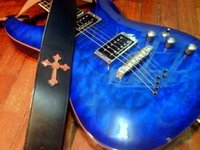 Run by a guitarist named Kenny Goh! This is an awesome resource for guitarists!
An amazing website of great stuff, done by someone who seems pretty genuine (he's not trying to just sell something)... here are plenty of youtube.com vidoes on his blog, and almost all are his revisions of how to play certain electric guitar licks.. very very good site! Check it out! Be sure to send your church guitarist here!
guitar, instruction, lead, learning, songs, training, video, worship in Guitar, Music Training