New Stuff

Worship Tech Web Tools Blog

4192093_illustration.gifThis is an ongoing blog of web tools and technology related to worship, music and church. The idea is to give you good web points and resources that you can go to. Some of it is just me cruising the net, others are favorites of friends.

Enjoy what you see here.  If you find an interesting, useful and technology related site or resource that deals with helping worship or musicians in general, please send us a note and we will check it out. Perhaps we can feature it here.

Thanks!

Enjoy! - Kim Gentes

Entries in Music Training (8)

BeatLab - Make Online Rhythm Patterns Instantly (Kim Gentes / Worship Tech Blog)

Sometimes all you want to do is make some pattern for rhythm that you can use as a loop pattern for other things. Or maybe you are working on a quick idea and aren't at home to put it down in your music creation software or access to your instrument.  Or, perhaps you are just curious as to how you can see a rhythm track in a linear format.  Beatlab is an online simple tool for building basic loop tracks, much in the same core way that anyone would compose a loop for electronic music, or even lay down a rhythm section with MIDI or loop software. But it is online, simple and free to use.  There are user plugins for uploading your own sounds and a lot of features once you have the basic things down. You can even download your loop for use offline, which is kind of nice.

Beatlab isn't necessarily for hard core development of songs, but I like it as an inspirational pit stop on the creative internet highway. I stop by occasionally if I have a rhythm in my head and I want to flesh it out without pulling out all my musical gear.  You can save your compositions too, so you don't lose online ones you've created. It uses your Facebook credentials to store context, but it is not heavy handed (like some Facebook apps are) as it always asks if you want to post things to Facebook before doing so. I like that courtesy. One note on the technology side of this site- like almost every music app online- it does use Flash. So it won't work on your iOS devices. Just pure web folks.

Anyways for the loopers, scratchers and tweekers of the electronic and rhythm worlds, BeatLab is like stopping at Wafflehouse- not exactly the kind of meal you'd do important dates at, but it has the basics when you need to use them. And heck- its free.  Check it out.

http://www.beatlab.com

Here is a very simple loop I created with it.

http://bit.ly/oRQQSS

I noticed a lot of other users creating more beat loops for rap and such. I prefered a bit of an electronica loop myself, but you can create whatever you want. Go try it out.

in the rhythm of heaven

Kim Gentes


Internet, Music and Math: How to Waste Time With Three Fun Things (Kim Gentes / Worship Tech Blog)

Remember the promises of science fiction? Well, things haven't turned out quite the way the Jetsons promised us. When they said "Flying cars, robotic servants, instant meals", we didn't know they meant "Southwest Airlines, automated sales calls to our cell phones, and McDonald's happy meals".  But who's to blame? Well certainly not Batuhan Bozkurt.

Batuhan is a "sound artist" and programmer living in Istanbul, Turkey.  And he has done his part in bringing forth the joyous reality of that fantasy of almost all great science fiction- the fusion of technology and art. But is it that hoped-for utopia where ones own thoughts of melodies were enough for mind-reading computers to generate the symphonic masterpeices of the future?  Mr. Bozkurt doesn't promise such glorious realities, but he takes the needed baby-steps for our neophite, web-connected world. He calls it Otomata.

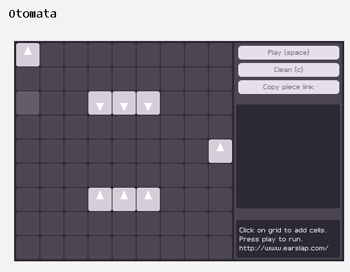
Quite simply, Otomata, is a sound generation web application. It generates tones based on a 9x9 grid which contains any number of bouncing boxes. You start with a blank grid. You add your boxes. You click play. The fun begins.

This might seem trivial (and it is), but Otomata is based on the same rules of operation that most iOS apps and even the first video game (Pong) held to- collision and redirection.  The boxes you place on the grid all move, in any of the 4 directions you instruct them to. When they hit another  box or a wall they alter direction. When they hit a wall, they emit a sound. The grid is set up in a specific musical configuration so that notes ascend a scale from left to right. You get the idea quickly. You develop patterns that create sound loops for basic rhythm and meter. Add some melodic chaos notes (boxes) to overlay said patterns of rhythm.

But the more complex you make them, the less sure you are of a clean results, or one that sounds musical (instead of an explosion of computer sounding blurps).

But enough talk. Try it out! Otomata is online, for all to try (apparantly, phone apps are in the works as well). You can go here and get started:

http://www.earslap.com/projectslab/otomata

Now for the really cool part. Once you develop an interesting pattern on Otomata, click the "Copy piece link" and you have the URL to your musical/web/grid configuration. Share it with your friends, build on each other's patterns. All very fun, time wasting and addictive.  Real musos will initially bauk at this trivial tool, but finding the patterns is the key. Don't waste your time just throwing blocks on the board (at least don't keep doing it after 30 minutes or so). If you just do that, of course, you will be bored. Instead, start to develop a library of patterns that you can re-use for your bass end, your mid-chords and your high end rhythms.  Then, start to mix and match and see what happens.

The app is online for anyone who has a web browser. Oh, a real web browser I mean- this one is in Flash, so you can't play it on iPads or iPhones (at least until they add Flash).  However, the folks who wrote this online application have a great new port for the iOS devices and you can also download an app for your iPhone/iPod/iPad as well to take Otomata mobile.

Here are a couple patterns I worked on that I use as a base for more "compositions". Real music? Hmmm.. maybe not. But inventive, thoughtful, and certainly musical fun. You decide.

http://www.earslap.com/projectslab/otomata?q=4g3k5z4x0d0v7n7a8d8v

http://www.earslap.com/projectslab/otomata?q=3n4n5n3a4a5a8j0q177r

http://www.earslap.com/projectslab/otomata?q=3n4n5n3a4a5a8j0q


It's a fun time waster.. and your pattern recognition skills may just improve along the way!

Thanks Otomata! Thanks Batuhan Bozkurt!


Let's go people---

Go forth and blipify! 

Kim Gentes



WorshipTeam.com Music "Perform" function - Chord Chart & Lyric display (Kim Gentes / Worship Tech Blog)

WorshipTeam.com updated its service to add a nice new feature for those who love using chord charts and songs from WorshipTeam.com.

For iPad or android tablet owners, check out the new "perform" function now online in the new UI on the mobile site. The goal of the "Perform" button is to allow you to have a simple, clean interface with readable chord charts displayed allowing you to page through them, just like you would for a physical songbook on a music stand. Great for use on a stage, in a small group or at home practicing. Your service/set is ready to go without having to print anything off. Here is is how to try it out --

  • STEP 1: From your tablet or iPad go to http://m.worshipteam.com . Login and select the "Services" option to see your upcoming services.


  • STEP 2: Go to one of your upcoming services on your schedule and select the "Perform" button.


  • STEP 3: You will see the first song appear. Controls on the top right allow you to page through the songs. You can also use motion/swipe to move through the songs.


  • STEP 4: Formatting controls are at the bottom of the page if you would like different font and size properties. Note that you can turn chords on or off, depending on your needs (vocalists often only want lyrics displayed for example).


The music perform function works great on iPads used as music stands (as can be done easily b mounts like iKlip (http://www.ikmultimedia.com/iklip/features/), GigEasy (http://www.thegigeasy.com/) or Griffin iPad music stand mounts (http://www.griffintechnology.com/products/mic-stand-mount).

The music perform function is free with WorshipTeam.com and does not cost extra. Any WorshipTeam.com user can use this function.


bless you!

Kim Gentes


Metronome Online (Kim Gentes Worship Tech Blog)

Sometimes you just need a reliable time keeper while you work on a tune.  You don't always remember to bring your metronome with you as you go through your day.  Now, you can have one with you, ready to work when you are. MetronomeOnline.com is an online web app that has tempo settings from timing, style and mode. You can change all the important parameters.

They also have purchasable cell phone versions available, but they charge for those.  It's not necessary to pay, since either Android or iPhone both contain free metronome apps in their respective markets.

If you need an online metronome, though, this free, usable and well thought interface is a nice quick web answer.

Check it out here:

http://www.metronomeonline.com/


Keeping His timing,

Kim Gentes


User Experiences with Worshipteam.com

A video from Danny Mullins, a local church worship leader in Arizona who uses Worshipteam.com.

You can try a free trial for a month at http://www.worshipteam.com/try

A Chord a day-- will it keep the Doctor away?

aChordADay.comIf you're like me you spend a lot of time doing a lot of stuff. Some of it necessary, some of good, but a lot of it just busy-work.  After a while, you forget what you like to do.  For guitarists, sometimes you don't have an hour to sit down and practice, or even 30 minutes.  Unless you play professionally, your life is spent with a lot of other things to keep the lights on and the roof over your head.

So when you want to learn something with guitar, you go a couple routes- find a course or scheduled lesson with a good teacher who can push you further.  Or, if you just have the desire to learn a bit each day, but aren't at a place to do a lot more right now, it can be nice to get a little nugget of guitar wisdom each day.

This is where a site like "A Chord A Day" (www.achordaday.com) can come in real handy.  Az Samad is a noted fingerstyle guitarist from Malaysia, who has put together a simple, but effective little online respite for the wandering guitarists out there.  Nothing fancy, but a nice vibrant chord each day for you to consider. It includes a short measure or two of sample notation, and a nice online audio demo of the chord, along with a sentence or two from Az.  Like musical vitamins for the guitarist each morning, this might indeed keep that muse-hated physician "Doctor Boredom" away for another day.  Check it out (www.achordaday.com)

Kim Gentes

Guitar Praise Blog

Run by a guitarist named Kenny Goh!  This is an awesome resource for guitarists!

An amazing website of great stuff, done by someone who seems pretty genuine (he's not trying to just sell something)... here are plenty of youtube.com vidoes on his blog, and almost all are his revisions of how to play certain electric guitar licks.. very very good site! Check it out!  Be sure to send your church guitarist here!

http://guitarpraise.blogspot.com/

Ear Training Tools

The Interval Ear Trainer is a great online application.  It runs a series of tests on your ability to hear note changes (which those fancy, schmancy musicians call "intervals").  Even if you don't score high at first, use the tool to keep getting better.  You will find it does help you get a better "music memory", allowing you to more quickly know the interval change you heard.

You should really check this great ear training tool out online.

http://www.musictheory.net/trainers/html/id90_en.html